<?xml version="1.0" encoding="utf-8"?><feed xmlns="http://www.w3.org/2005/Atom" ><generator uri="https://jekyllrb.com/" version="4.3.4">Jekyll</generator><link href="https://mrk.sh/feed.xml" rel="self" type="application/atom+xml" /><link href="https://mrk.sh/" rel="alternate" type="text/html" /><updated>2026-11-07T17:17:01+02:00</updated><id>https://mrk.sh/feed.xml</id><title type="html">mrk.sh</title><author><name>Marek Pruteanu</name><email>marek@mrk.sh</email></author><entry><title type="html">Increase Service Bus Session Processor Throughput</title><link href="https://mrk.sh/increase-service-bus-session-processor-throughput/" rel="alternate" type="text/html" title="Increase Service Bus Session Processor Throughput" /><published>2025-01-29T21:30:00+02:00</published><updated>2025-01-29T21:30:00+02:00</updated><id>https://mrk.sh/increase-service-bus-session-processor-throughput</id><content type="html" xml:base="https://mrk.sh/increase-service-bus-session-processor-throughput/"><![CDATA[<p>My application was processing Service Bus messages at a <em>really slow</em> pace, in a scenario where message sessions, based on
the session ID, are pretty much unique.</p>

<p>The message session mechanism is used to achieve FIFO message delivery. In my case, the session ID represents a customer
ID. It’s useful to process customer-related messages in order, but in most cases, same-customer messages are far apart.</p>

<p>I realized how bad the situation was when producers started failing, because the topic’s max size (5GB) was hit.</p>

<p>The code below is C#, but the Service Bus SDK is similar in other ecosystems like Java. For DI purposes,
your <code class="language-plaintext highlighter-rouge">ServiceBusClient</code> and <code class="language-plaintext highlighter-rouge">ServiceBusSessionProcessor</code> should be registered as singletons. If you’re dealing with
more than one topic/subscription, you can register multiple keyed singletons with <code class="language-plaintext highlighter-rouge">AddKeyedSingleton</code>.</p>

<div class="language-csharp highlighter-rouge"><div class="highlight"><pre class="highlight"><code><span class="kt">var</span> <span class="n">client</span> <span class="p">=</span> <span class="k">new</span> <span class="nf">ServiceBusClient</span><span class="p">(</span><span class="s">"my-connection-string"</span><span class="p">);</span>
<span class="kt">var</span> <span class="n">opts</span> <span class="p">=</span> <span class="k">new</span> <span class="n">ServiceBusSessionProcessorOptions</span>
<span class="p">{</span>
    <span class="n">ReceiveMode</span> <span class="p">=</span> <span class="n">ServiceBusReceiveMode</span><span class="p">.</span><span class="n">PeekLock</span><span class="p">,</span>
    <span class="n">AutoCompleteMessages</span> <span class="p">=</span> <span class="k">false</span><span class="p">,</span>
    <span class="n">MaxConcurrentSessions</span> <span class="p">=</span> <span class="m">20</span><span class="p">,</span>
<span class="p">};</span>
<span class="kt">var</span> <span class="n">sessionProcessor</span> <span class="p">=</span> <span class="n">client</span><span class="p">.</span><span class="nf">CreateSessionProcessor</span><span class="p">(</span><span class="s">"my-topic"</span><span class="p">,</span> <span class="s">"my-subscription"</span><span class="p">,</span> <span class="n">opts</span><span class="p">);</span>
</code></pre></div></div>

<p>At first, I didn’t give much thought to <code class="language-plaintext highlighter-rouge">MaxConcurrentSessions = 20</code>. It was just a number I came up with after reading
the official <a href="https://github.com/Azure/azure-sdk-for-net/blob/main/sdk/servicebus/Azure.Messaging.ServiceBus/samples/Sample05_SessionProcessor.md">sample code</a>.</p>

<p>The application in question is running in multiple pods in Kubernetes. Since the work involved in message processing is lightweight,
I figured processing 20 messages at roughly the same time, per pod, would be enough.</p>

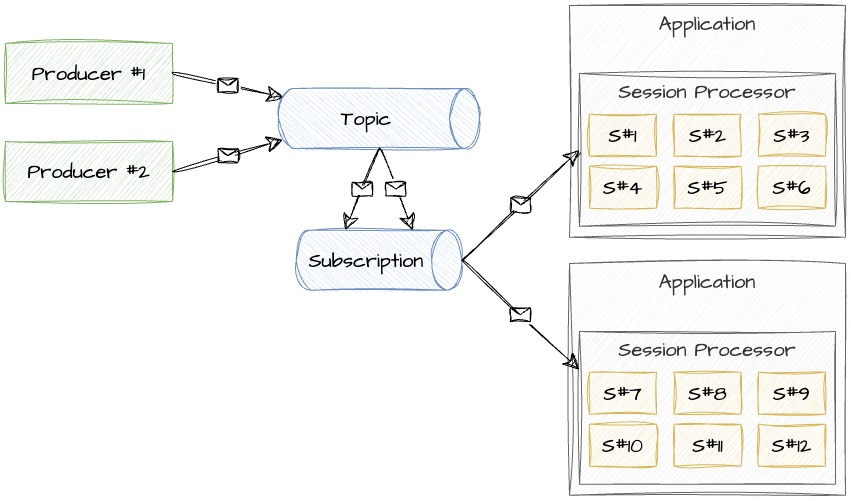
<p>In fact, let’s reduce <code class="language-plaintext highlighter-rouge">MaxConcurrentSessions</code> to 6. The diagram below shows exactly that case.</p>

<p><img src="/assets/images/sb.jpg" alt="Service Bus Session Processor" /></p>

<p>Let’s say producers push 36 messages, each with a unique session ID.
Suppose it takes 200ms to process a single message.
With this setup, you’re gonna see each application instance process 6 messages, almost instantly. This translates to 6
different open sessions per instance.</p>

<p>But then… it pauses. It doesn’t process the remaining messages for a while. Is it stuck? Is there a bug in the SDK?
Is it a network issue? Hard to tell.</p>

<p>After a while, each instance processes 6 more messages, and then it pauses again. Looks like a pattern. But it’s way
more difficult to figure out why these hiccups happen in a busy production environment with more instances, as they
are booted up at slightly different times, so processing starts and pauses at different times.</p>

<p>It’s one of those cases where you’re offered a shiny, rather high-level SDK, that you’re only supposed to configure
correctly. But configuration varies wildly based on the throughput you require. And you can only give a guesstimate
for that throughput before your app hits production.</p>

<p>It turns out that a session, once open (like after receiving a message), will remain idle for a set amount of time,
waiting for a new message. Or, if the message takes too long to process, the session will also time out. The option
controlling this is called <code class="language-plaintext highlighter-rouge">SessionIdleTimeout</code>, which is set to <strong>1 minute</strong> by default. This is exactly the pause
from before.</p>

<p>Given a situation where most of your messages have unique session IDs, throughput can be calculated like this:</p>

<pre><code class="language-txt">number_of_application_instances * max_concurrent_sessions / session_idle_timeout
</code></pre>

<p>e.g., 4 instances, with <code class="language-plaintext highlighter-rouge">MaxConcurrentSessions = 100</code>, and <code class="language-plaintext highlighter-rouge">SessionIdleTimeout = TimeSpan.FromSeconds(30)</code> gives you
<em>roughly</em> 800 messages per minute.</p>

<p>Adjust as needed.</p>

<p>Read more:</p>

<ul>
  <li><a href="https://learn.microsoft.com/en-us/azure/service-bus-messaging/message-sessions">https://learn.microsoft.com/en-us/azure/service-bus-messaging/message-sessions</a></li>
  <li><a href="https://learn.microsoft.com/en-us/azure/service-bus-messaging/service-bus-performance-improvements?tabs=net-standard-sdk-2">https://learn.microsoft.com/en-us/azure/service-bus-messaging/service-bus-performance-improvements?tabs=net-standard-sdk-2</a></li>
</ul>]]></content><author><name>Marek Pruteanu</name><email>marek@mrk.sh</email></author><category term="azure" /><category term="service-bus" /><summary type="html"><![CDATA[My application was processing Service Bus messages at a really slow pace, in a scenario where message sessions, based on the session ID, are pretty much unique.]]></summary></entry><entry><title type="html">Fix DisplayLink on Kernel 6.0 and up</title><link href="https://mrk.sh/fix-displaylink-kernel6.0/" rel="alternate" type="text/html" title="Fix DisplayLink on Kernel 6.0 and up" /><published>2022-11-07T03:30:00+02:00</published><updated>2022-11-07T03:30:00+02:00</updated><id>https://mrk.sh/fix-displaylink-kernel6.0</id><content type="html" xml:base="https://mrk.sh/fix-displaylink-kernel6.0/"><![CDATA[<p>I’m on <code class="language-plaintext highlighter-rouge">Pop!_OS 22.04</code> and my external monitors stopped working after the latest kernel update to <code class="language-plaintext highlighter-rouge">6.0.3-76060003-generic</code>. I figured it must be an issue with DisplayLink,
so I downloaded their latest driver <code class="language-plaintext highlighter-rouge">5.6.1</code> and was met with an <code class="language-plaintext highlighter-rouge">evdi</code> build error when trying to install it.</p>

<p>This is what worked for me.</p>

<h2 id="uninstall-displaylink">Uninstall DisplayLink</h2>
<div class="language-sh highlighter-rouge"><div class="highlight"><pre class="highlight"><code><span class="nb">sudo </span>displaylink-installer uninstall
</code></pre></div></div>

<h2 id="download--install-latest-evdi-kernel-module">Download &amp; install latest EVDI kernel module</h2>
<p>Support for kernel 6.0 was added in <a href="https://github.com/DisplayLink/evdi/commit/bdc258b25df4d00f222fde0e3c5003bf88ef17b5">this commit</a>.
There isn’t a new official release yet, so we need to manually install it as 1.12.0.</p>

<div class="language-sh highlighter-rouge"><div class="highlight"><pre class="highlight"><code>git clone git@github.com:DisplayLink/evdi.git
<span class="nb">sudo cp</span> <span class="nt">-r</span> evdi /usr/src/evdi
<span class="nb">cd</span> /usr/src
<span class="nb">sudo ln</span> <span class="nt">-s</span> evdi/module evdi-1.12.0
<span class="nb">sudo </span>dkms <span class="nb">install </span>evdi/1.12.0
</code></pre></div></div>

<h2 id="download--install-displaylink-561">Download &amp; install DisplayLink 5.6.1</h2>
<p>The installer will detect that <code class="language-plaintext highlighter-rouge">evdi/1.12.0</code> is already installed, so it won’t attempt to build/install it again.</p>

<div class="language-sh highlighter-rouge"><div class="highlight"><pre class="highlight"><code>wget <span class="nt">-O</span> displaylink_5.6.1.zip https://www.synaptics.com/sites/default/files/exe_files/2022-08/DisplayLink%20USB%20Graphics%20Software%20for%20Ubuntu5.6.1-EXE.zip
unzip displaylink_5.6.1.zip <span class="nt">-d</span> displaylink_5.6.1
<span class="nb">cd </span>displaylink_5.6.1
<span class="nb">sudo</span> ./displaylink-driver-5.6.1-59.184.run
</code></pre></div></div>

<p>You should be prompted to reboot after it finishes installing.</p>]]></content><author><name>Marek Pruteanu</name><email>marek@mrk.sh</email></author><category term="linux" /><category term="displaylink" /><summary type="html"><![CDATA[I’m on Pop!_OS 22.04 and my external monitors stopped working after the latest kernel update to 6.0.3-76060003-generic. I figured it must be an issue with DisplayLink, so I downloaded their latest driver 5.6.1 and was met with an evdi build error when trying to install it.]]></summary></entry></feed>